
In the third of the series of articles on writing metric symbols, I propose a practical solution to improve the writing of metric symbols. My solution addresses one major source of metric symbol errors that I identified in my previous article.
Many writers avoid the use of characters that have no keys for them on a standard keyboard. When these characters appear in metric symbols, many tend to write their own made-up versions. A standard English-language keyboard looks like this:
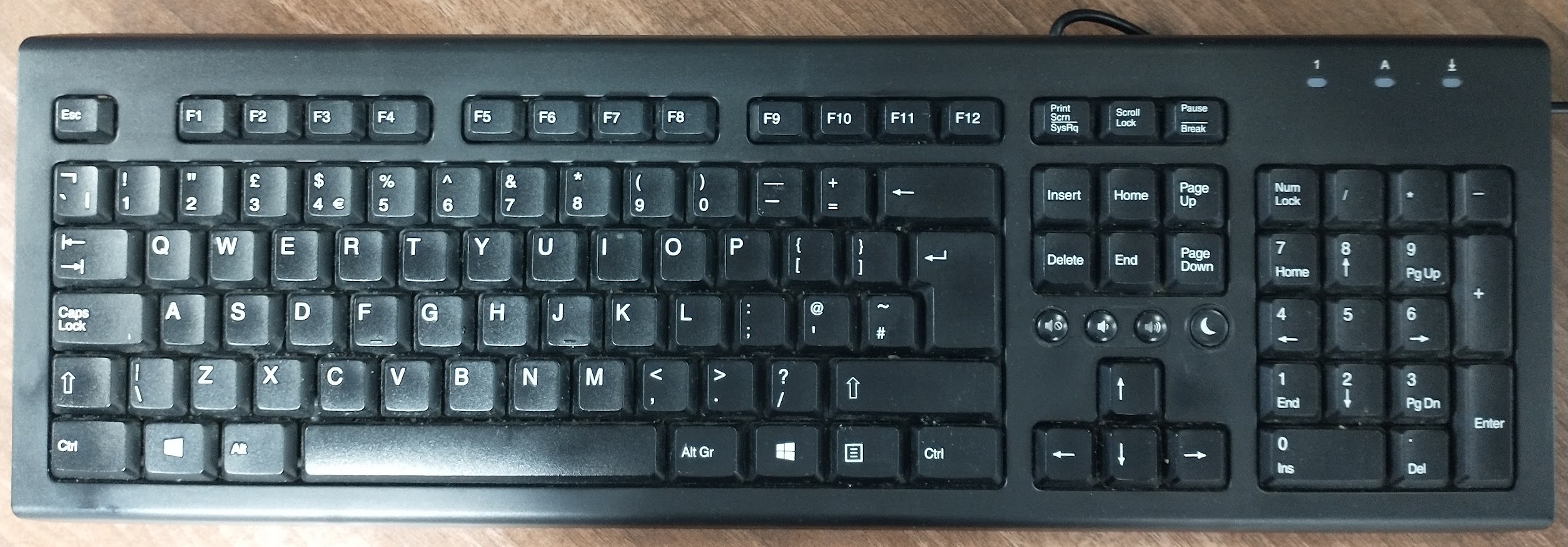
As you can see there is no degree symbol, no non-breaking space, no micro sign (µ), no Superscript Two and no Superscript Three characters. There are distinct Unicode characters for the last two and are different from the “2” and “3” characters that appear on the keyboard.
On the keyboard, the key for the number “4” on the top row of the main set of keys can be used to produce the number “4”, the $ sign and the € sign. The latter is produced by pressing the Alt Gr key and holding it down while pressing the “4” key. I propose that keyboards should be adjusted, with appropriate adjustments to operating systems and software to support frequently used extra characters. These characters can be shown in the yellow squares in the following image:
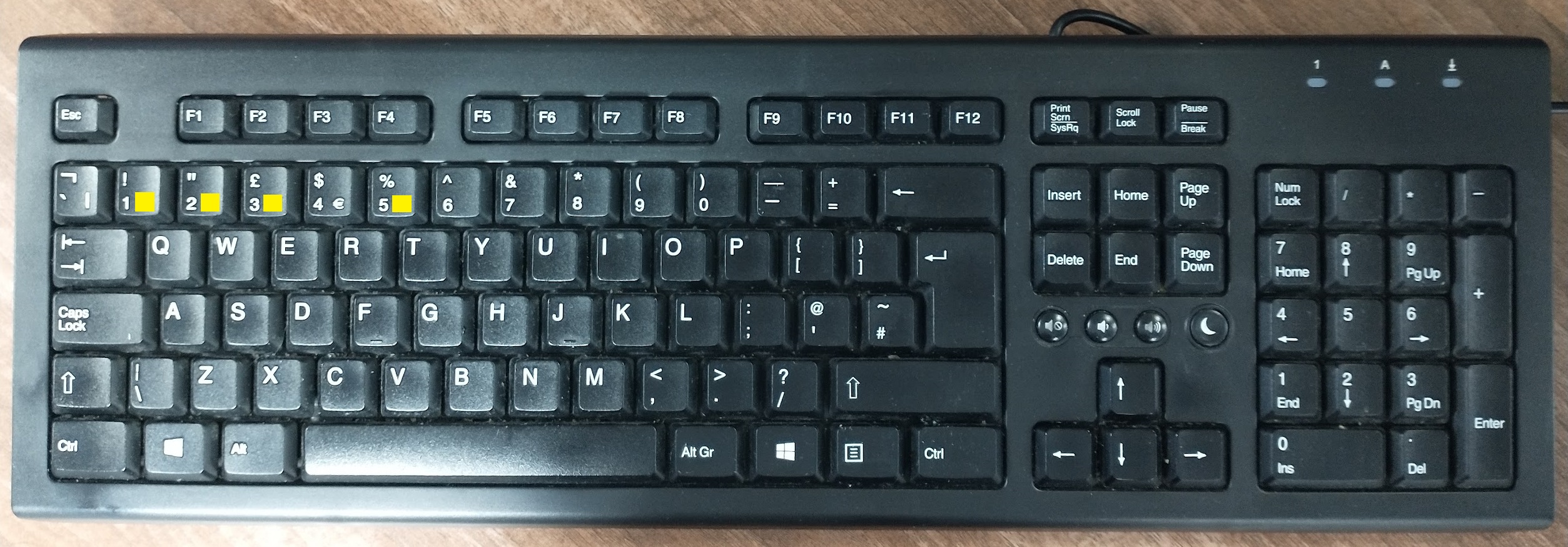
These extra characters would be produced in the same way as the € sign – by pressing the relevant key while holding down the Alt Gr key. The € sign is typed by pressing the “4” key while holding down the Alt Gr key. A special graphic would be required to show a non-breaking space. Here is one proposed design for the non-breaking space character:
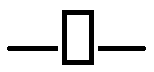
Obviously, it would need to be in colours that differ from the key’s colour. This is just my idea. It is not the only possible design. The non-breaking space character could appear on the “5” key. I suggest that writers should be able to produce this character when they press the “5” key or the spacebar while holding down the Alt Gr key. The non-breaking space differs from a standard space by ensuring that the text on both sides of it are not split by a line break. Non-breaking spaces are used for thousands separators and to separate numbers and metric symbols.
Other commonly used symbols that should also appear on the standard keyboard are:
- ° (degree symbol)
- ² (superscript two)
- ³ (superscript three)
These could appear on the “1”, “2” and “3” keys respectively. Users would type them by pressing the relevant key while holding down the Alt Gr key in the same way that they do for the € (euro) symbol.
The avoidance of characters with no key is a major source of errors when writing metric symbols. They end up being omitted like the degree symbol when writing about temperatures or avoided by the use of language-specific abbreviations. The non-breaking space is frequently omitted altogether for all metric symbols. It is my hope that extra characters on keyboards supported by operating systems and software would lead to a lot more correct usage of metric symbols.
 Metric Views
It’s probably helpful to disclose that the keyboard that you’re discussing is the Microsoft keyboard. When I was a Windows user, I found that there were a number of characters for which there was a four-digit Unicode sequence. This involved holding down the [Alt] key while pressing the number keys. Some of the characters, like curly quotation marks and n- and m-dashes, I used so frequently that I memorized the sequences. Sadly it’s too long ago for me to remember now.
Mac users, who have no [Alt Gr] key, will know that the characters to which you are referring can in the majority of cases be produced with keyboard shortcuts using either one of the [alt] keys. (And, btw, the € symbol is alt+2.) ° as in “degrees” is alt+*. Superscripts 1, 2, 3 &c., can be produced with cmd+Ctrl+[+], likewise subscript with cmd+ctrl+[-], if the software allows for it (as this apparently doesn’t). Likewise a non-breaking space is accomplished on Mac by alt+shift+space as in 11 000. Take it from me that putting extra spaces into the line before the number, so as to drive it to the end of the line, the whole 11 000 will drop to the next line, not just the 000, leaving the 11 orphaned on the line before. So putting a non-breaking space between a number and a symbol, such as 10 kg, is very straightforward.
LikeLike
I apologize. If only I’d bothered to read the preceding item first, before sounding off. Nevertheless. It’s _still_ easier with the apple keyboard.
LikeLike
Good idea! As it happens, the US standard keyboard already uses the ALT GR key to produce extra characters very closely along the lines you suggest. This is an interesting web site:
https://en.wikipedia.org/wiki/AltGr_key
You will note that the standard UK keyboard makes little use of the ALT GR key. However I have found by experimentation that there are additional undocumented functions, e.g. the combination ALT GR + c produces the copyright symbol (©) in MS Office (I don’t know whether it will appear here).
For the non-breaking space, it would be intuitive to produce this with ALT GR + SPACE, but in MS Office this starts the auto-read-aloud.
This certainly looks like an idea worthy of promotion; whether Microsoft et al will be prepared to take it up is another matter.
LikeLike
I run Windows 10 and have installed the Greek keyboard on my machine. I have an icon at the bottom right of my screen that current shows “ENG”. If I click it, I can select the Ελλασ (Greek) keyboard and it will show “ΕΛ”. Furthermore, if I go into the “Windows Ease of Access” sub-menu and choose “On-screen keyboard”, a keyboard appears on my screen which shows the current keyboard setting. From it, I can easily write (Switching to Greek and then switching back to ENglish) 123 °C, or I can write 34.6 Ω. (Fortunately I have two screens).
However I have to use the Unicode value for a fixed-length no-breaking spce (202F or 8239) which does not always work.
LikeLike
I checked the Wikipedia site https://en.wikipedia.org/wiki/Whitespace_character to find the UNICODE alues for various spacing characters. Those that are of interest to us are:
U+0020 – SPACE – Standard space character that we find on all computers. Its width can be adjusted if needed to enable left and right justification of text.
U+00A0 – NO-BREAK SPACE – Creates a non-breaking space of avaiable width. Not recommended for use when quoting SI values.
U+2007 – FIGURE SPACE – creates a non-breaking space equal to one numerical digit in width. Designed for use when writing columns of figures and is useful for separating the number and the units when quoting an SI value.
U+202F – NARROW NO-BREAK SPACE – creates a non-breaking space that is about one third of a normal space. It is useful as a thousands separator when writing numbers.
UNICODE is silent as to how these various types of space should be entered on the keyboard, but in theory, as there are three modifier keys (Shift, ALT and Alt Gr). there exists eight different ways to enter spaces on a standard PC keyboard – pressing the space bar and any combination (including none or all) of the three modifier keys. Thus four of these cominations could be mapped onto the keyboard and the otehr four left unassigned.
LikeLike
Shouldn’t that be ‘Ελλας?
LikeLike
You might be right – I guessed. MyGreek stamps all have “Greece” written in upper case letters – “ΕΛΛΑΣ”. I assumed that the lower case version of “Σ” was “σ”.
LikeLike